
Sometimes I think we can be working on exercises or small programs in class and it’s all fine and good, but there’s an underlying thought of “this is cool and all, but how would it actually be used?”
I code things all the time to make my life better. Often times I do this in languages like javascript because so much of what we do is tied to the web, but a problem came up the other day and I thought it’d be fun to solve it with VB.net since we do so much of it in class.
The problem:
A member from the ECTS administrative team came to me with an issue. We had over 700 student photo images that were named incorrectly (they were supposed to be name by PersonId, but were instead named by StudentNumber). These images are used in various systems such as infinite campus, and for the system to work right, they must be named correctly (eg. 09874.jpg). What needed to happen is that every file needed looked up, and then renamed with the correct identifier (eg. a file named 876934.jpg needed renamed to 09874), changing it from StudentNumber to PersonID (this should make a little more sense when you become familiar with databases)
This task manually would take several hours to complete. Thanks to the power of coding, I had it solved in 30 minutes…and 20 of those minutes were just for creating logs and checking my work!
The solution:
The solution was pretty straight forward. I had an export provided by one of the ECTS secretaries that had the student’s names, labs, personId and studentNumber in it, so it was really just a matter of automating the process of looking up a value and using another value to rename the file.
Here’s a sample of what a csv looks like (student names have been replaced):
Note that each field is just separated (delimited) by a comma.
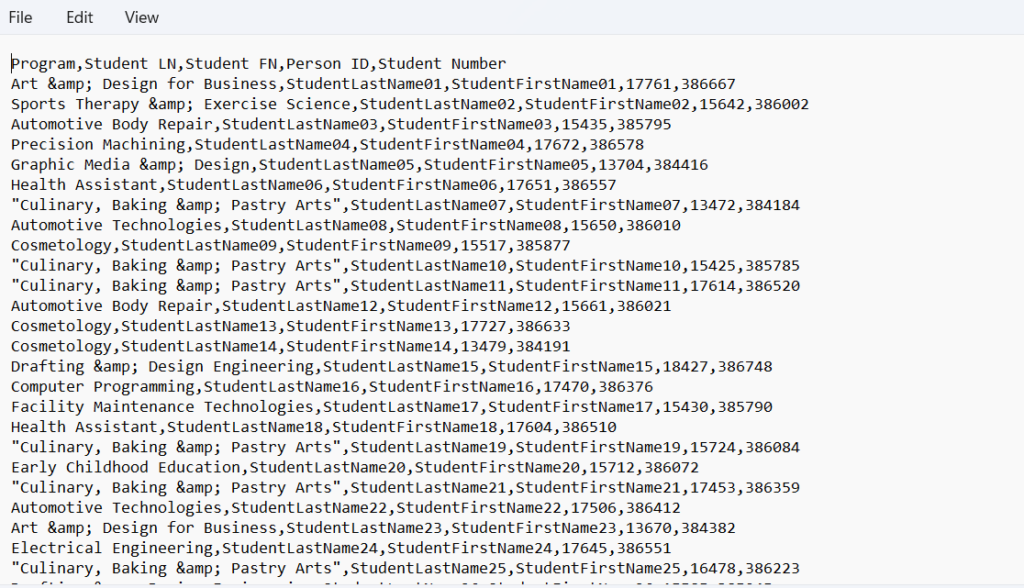
I created a student class to store the student info in it, and then created a dictionary that had the studentNumber (the wrong file name) as the key, and then the student object as the value.
I looped through the csv export file to build the dictionary, and then I recursively searched the photos directories for files that had a matching key in the dictionary. When there was a match, I renamed the file with the new Id (from the personId value in the dictionary lookup)…and just like that, the program ran for about 2 seconds and the job was done (aside from me verifying it’s success).
Admittedly, I did not know off the top of my head half the methods I was going to use when I started the project, but I knew it was possible, and I knew it’d be easy. This is the point I want my students to get to. I knew how to solve the problem, I just didn’t know all the syntax without looking it up. That’s what google is for. Have a solution/plan, then have the confidence to use resources to put it together.
Here’s the code (note: most of it is actually for logging):
Imports System.IO
Imports Microsoft.VisualBasic.FileIO

Module Module1

    'holds a key of the wrong id (filename to be changed) and a student object with correct info
    Private records As Dictionary(Of Integer, Student)
    'a list used to record ids of updated records/files
    Private updated As List(Of Integer)
    'directory to start the jpg search from
    Private rootpath As String = "C:\Users\JKlins\Downloads\PhotoRenameProject\"


    Sub Main()
        records = New Dictionary(Of Integer, Student)
        updated = New List(Of Integer)
        'Open the supplied csv (comma separated values) file
        Dim tfp As New TextFieldParser(rootpath & "export.csv")
        tfp.Delimiters = New String() {","}
        tfp.TextFieldType = FieldType.Delimited

        'create a log to report any errors (duplicate keys) in supplied report
        Dim errorLog As StreamWriter = My.Computer.FileSystem.OpenTextFileWriter(rootpath & "errorlog.txt", True)
        tfp.ReadLine() ' skip header
        While tfp.EndOfData = False
            Dim fields = tfp.ReadFields()
            Dim s As Student = New Student(fields(0), fields(1), fields(2), fields(3), fields(4))
            'The supplied report contained duplicate records for students with the same name/id, but in different programs.
            'Prevent duplicate keys and print the error if encountered.
            If records.ContainsKey(fields(4)) Then
                errorLog.WriteLine("Duplicate Key Found|" & s.toPipeSeparated() & "|" & records(fields(4)).toPipeSeparated)
            Else
                records.Add(fields(4), s)
            End If

        End While
        errorLog.Close()
        renameFiles()
        verifyStudentsWithoutPictures()
    End Sub

    ''' <summary>
    ''' finds all jpgs from a root path and then looks up the ids in the records dictionary
    ''' if the record is in the dictionary it renames the file to use the person id
    ''' logs all changes, errors, and missing images
    ''' </summary>
    Sub renameFiles()
        'get array of all file paths to jpgs from the starting directory
        Dim myfiles As String() = IO.Directory.GetFiles(rootpath, "*.jpg", IO.SearchOption.AllDirectories)
        'open file streams to log errors, changes, and missing keys
        Dim errorLog As StreamWriter = My.Computer.FileSystem.OpenTextFileWriter(rootpath & "errorlog.txt", True)
        Dim changeLog As StreamWriter = My.Computer.FileSystem.OpenTextFileWriter(rootpath & "changelog.txt", True)


        'loop through each file and if it matches a key, rename it with the personid
        For Each fp As String In myfiles
            Dim oldFilename As String = Path.GetFileName(fp)
            Dim newFilename As String = ""
            Dim id As String = oldFilename.Replace(".jpg", "")
            Dim idInt As Integer
            Integer.TryParse(id, idInt)
            If records.ContainsKey(idInt) Then
                newFilename = records(idInt).PersonId & ".jpg"
                My.Computer.FileSystem.RenameFile(fp, newFilename)
                changeLog.WriteLine("Successfully Changed|" & "|" & oldFilename & "|" & newFilename & records(idInt).toPipeSeparated())
                updated.Add(idInt)
            Else
                errorLog.WriteLine("Record not found for file: " & fp)
            End If
        Next
        'close the file streams
        changeLog.Close()
        errorLog.Close()

        verifyStudentsWithoutPictures()
    End Sub

    ''' <summary>
    ''' Loops through all records from the supplied report and if the record is not recorded in the changed array, it logs it
    ''' </summary>
    Sub findMissingPictures()
        Dim missingLog As StreamWriter = My.Computer.FileSystem.OpenTextFileWriter(rootpath & "studentsWithoutPics.txt", True)
        For Each key As Integer In records.Keys
            If Not updated.Contains(key) Then
                missingLog.WriteLine("No picture found for|" & records(key).toPipeSeparated)
            End If
        Next
        missingLog.Close()
    End Sub

    ''' <summary>
    ''' Opens the studentWithoutPics.txt file and removes any records reported missing that were actually just named correctly before the run.
    ''' Creates a new studentsWithoutPicFiltered.txt file
    ''' </summary>
    Sub verifyStudentsWithoutPictures()
        Dim tfp As New TextFieldParser(rootpath & "studentsWithoutPics.txt")
        tfp.Delimiters = New String() {"|"}
        tfp.TextFieldType = FieldType.Delimited

        Dim studentsWithoutPicsFiltered As StreamWriter
        studentsWithoutPicsFiltered = My.Computer.FileSystem.OpenTextFileWriter(rootpath & "studentsWithoutPicsFiltered.txt", True)
        tfp.ReadLine() ' skip header
        While tfp.EndOfData = False
            Dim fields = tfp.ReadFields()
            Dim myfiles As String() = IO.Directory.GetFiles(rootpath, fields(4) & ".jpg", IO.SearchOption.AllDirectories)
            If myfiles.Length = 0 Then
                studentsWithoutPicsFiltered.WriteLine(fields(0) & "|" & fields(1) & "|" & fields(2) & "|" & fields(3) & "|" & fields(4))
            End If
        End While
        studentsWithoutPicsFiltered.Close()
    End Sub

    Class Student
        Public Property Program As String
        Public Property LastName As String
        Public Property FirstName As String
        Public Property PersonId As Integer
        Public Property StudentNumber As Integer

        Public Sub New(p As String, l As String, f As String, pid As Integer, sn As Integer)
            Program = p
            LastName = l
            FirstName = f
            PersonId = pid
            StudentNumber = sn
        End Sub

        ''' <summary>
        ''' used to simplify printing to log files.
        ''' Using pipe separator to skip past escaping commas in csv because some labs have commas in the name
        ''' </summary>
        ''' <returns>A String of all properties separated by a pipe</returns>
        Public Function toPipeSeparated() As String
            Return Program & "|" & LastName & "|" & FirstName & "|" & PersonId & "|" & StudentNumber
        End Function
    End Class
End Module