Introduction
Congratulations on completing your app build! Now, you’re ready to share it with the world. In this article, we’ll cover the essential steps to upload your Android and iOS apps to the Google Play Store and Apple App Store. This guide will help you navigate the complexities of the submission process, from setting up developer accounts to managing your store listings and ensuring compliance with each platform’s guidelines.
If you haven’t read Part 1 Go Here: https://ecosystem.ects-cmp.com/2024/09/06/how-to-start-a-react-native-app-a-step-by-step-guide/
Time To Complete Process: 1-2 Months
1. Creating Developer Accounts
Before you can upload your app, you need to set up developer accounts with Google and Apple.
Google Play Store
- Sign Up for a Google Play Developer Account:
- Visit the Google Play Console.
- Pay a one-time registration fee of $25.
- Complete your account setup by providing necessary details.
- Set Up Your Developer Profile:
- Fill in your profile information, including your developer name, email, and contact details.
Apple App Store
- Enroll in the Apple Developer Program:
- Go to the Apple Developer website.
- Enroll for $99/year.
- Follow the instructions to complete your enrollment and set up your account.
- Set Up Your Developer Profile:
- Provide your personal and company information, if applicable.
2. Preparing Your App for Submission
Ensure your app meets all necessary requirements before submitting it.
For Android:
Review the APK/Bundle:
- Ensure your APK or AAB (Android App Bundle) file is correctly signed and optimized.
- Test thoroughly for bugs and performance issues.
- Target API Level: Make sure your app targets at least API level 33 (Android 13) to comply with Google Play’s latest requirements.
- Crash Reporting: Set up Crashlytics or another crash reporting tool to monitor and resolve any post-launch issues.
Android Testers:
- You will need at least 20 testers to have it reviewed by the store. Here is an app you can download to upload your app link and use it for testing.
Create a Store Listing:
Implement Accessibility options in your app (e.g., voice commands, large text options, etc.) to enhance usability for all users.
App Description:
Write a compelling and clear app description that highlights its features and unique value.
Add Graphics:
Include high-quality screenshots, promotional graphics, and a feature graphic.
If applicable, create a short video that showcases the app’s features.
App Details:
Fill in the Content Rating, Categorization, and Privacy Policy sections accurately.
Compliance with Google Play Policies: Ensure your app follows Google Play’s Developer Policies, including rules for content, ads, in-app purchases, and data usage.
Data Safety Section:
Complete the Data Safety form in the Play Console to declare how your app collects, uses, and shares user data.
Localization:
Localize your store listing and app content to increase your app’s visibility in different regions.
Security and Privacy:
Ensure you have implemented secure data storage practices, such as encryption and secure user authentication.
Update your Privacy Policy in the store listing, making sure it reflects how your app collects and processes user data.
Accessibility Features:
For iOS:
Review the IPA:
- Correct Signing: Ensure your IPA file is signed with the correct provisioning profile and distribution certificate for the App Store.
- Real Device Testing: Test your app on real devices (across different iOS versions) to ensure it works as expected, handles various screen sizes, and maintains performance.
- Adherence to iOS Guidelines: Verify that your app adheres to Apple’s Human Interface Guidelines and App Store Review Guidelines to avoid rejection.
Create a Store Listing:
- App Description:
- Write a clear and engaging description that highlights the key features and benefits of your app.
- Ensure your app’s purpose and functionality are communicated within the first few lines.
- Consider adding keywords within the description to help with App Store search visibility.
- Add Graphics:
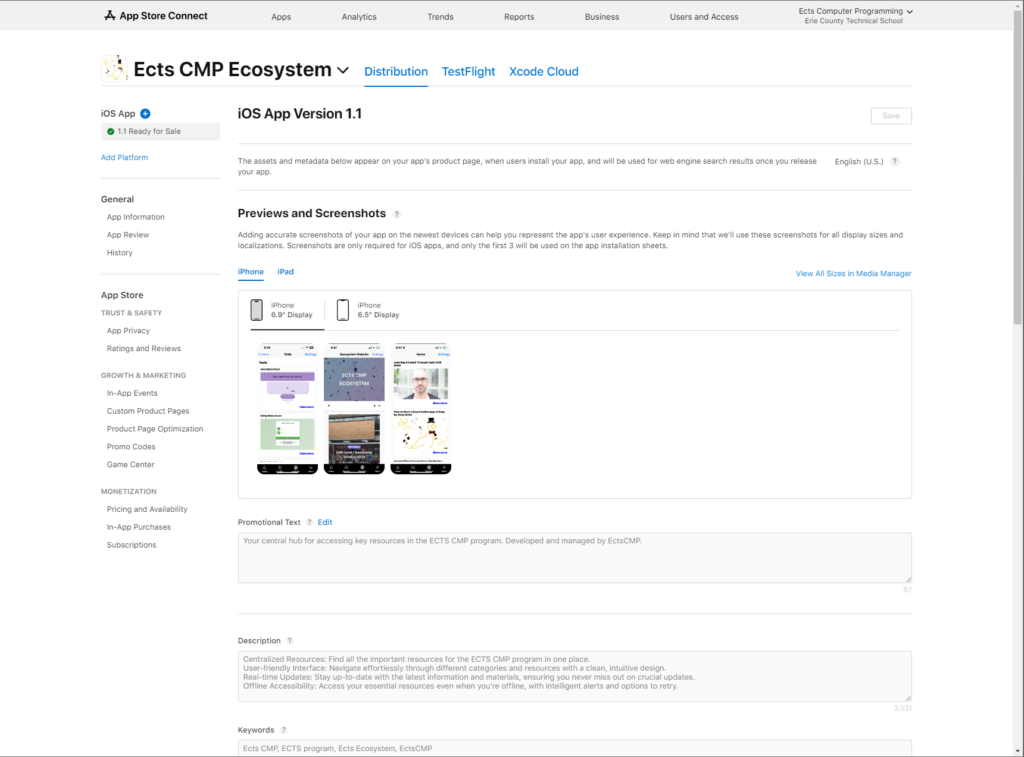
- Screenshots: Upload screenshots for each device family your app supports (iPhone, iPad, etc.).
- Make sure they show different functionalities of your app and are well-cropped and clear.
- App Icon: Ensure that your app icon is unique and follows Apple’s icon guidelines (1024×1024 px size, PNG format, no transparency).
- App Preview Video: If possible, upload an App Preview Video (15-30 seconds long) to give users a visual walkthrough of your app’s features.
- Screenshots: Upload screenshots for each device family your app supports (iPhone, iPad, etc.).
- App Details:
- App Categories: Select the appropriate Primary and Secondary categories for your app. Choose categories that best reflect the app’s purpose and maximize its visibility to your target audience.
- Pricing: Set your app’s pricing tier (free or paid) and enable in-app purchases if applicable. Ensure all in-app purchase items are registered and approved in App Store Connect.
- Content Ratings: Fill out the age rating questionnaire to determine your app’s appropriate content rating.
- App Store Connect Compliance:
- Privacy Policy: Ensure your Privacy Policy is updated and linked within the app and App Store Connect. It must reflect how your app handles user data and complies with Apple’s App Tracking Transparency (ATT) and GDPR requirements.
- App Tracking Transparency (ATT): If your app collects data for tracking purposes, ensure it includes a request for user consent with Apple’s ATT framework.
- App Metadata: Complete fields such as app version number, support URL, marketing URL, and contact information.
- Localization:
- Consider localizing your app’s listing (description, screenshots, and keywords) to reach a wider audience in different countries.
- TestFlight:
- Before release, consider using TestFlight to invite external testers to try your app. It allows for valuable feedback and helps catch any remaining bugs.
- Beta Testing: Run multiple beta tests and collect feedback from a broad range of users to ensure all use cases are covered.
- App Updates:
- For future updates, plan your app’s release strategy, including version control and improvements based on user feedback.
- Accessibility and Usability:
- Ensure your app offers Accessibility features (like VoiceOver, Dynamic Type, or support for Dark Mode) to cater to all users and increase your chances of getting featured on the App Store.
- App Review Process:
- Be aware of Apple’s App Review Process timeline. Some apps may take longer to review, particularly if they include complex features like subscriptions or health-related functionality.
3. Submitting Your App
Google Play Store:
- Upload Your APK/AAB:
- Go to the Google Play Console.
- Navigate to the “Release” section and upload your APK or AAB file.
- Complete the App Content:
- Fill out the required fields for app content and permissions.
- Add release notes and other relevant information.
- Submit for Review:
- Review all entries and click on “Review and Rollout” to start the submission process.

Apple App Store:
- Upload Your IPA:
- Use the Transporter app to upload your IPA file to App Store Connect.
- Complete the App Metadata:
- Ensure all metadata, including descriptions and screenshots, are accurate and complete.
- Submit for Review:
- Select the build for submission and click “Submit for Review” in App Store Connect.
4. Managing Your App’s Store Listings
Once your app is live, you’ll need to manage your listings to keep them up-to-date and engaging.
For Both Platforms:
- Monitor User Feedback:
- Regularly check user reviews and ratings.
- Respond to feedback and address any issues promptly.
- Update Your App:
- Release updates to fix bugs and introduce new features.
- Follow the submission process for updates, ensuring compliance with store guidelines.
- Track Analytics:
- Use platform-specific analytics tools to track app performance and user engagement.
5. Ensuring Compliance
Both app stores have strict guidelines. Regularly review their Google Play Policies and Apple App Store Review Guidelines to ensure your app remains compliant.
Conclusion
Uploading your app to the Google Play Store and Apple App Store can be a complex process, but with careful preparation and adherence to guidelines, you can successfully navigate the submission process. By creating developer accounts, preparing your app, and managing your store listings effectively, you’ll set your app up for success in the competitive app market.
Contact Me:
email me at:
for any questions.